



Introduction: Evolutionary Shift or Surface Polish?
Samsung’s One UI has long stood as one of the most feature-rich custom skins in the Android ecosystem. With the release of One UI 9, expectations were exceptionally high regarding system fluidity, deeper Galaxy AI integration, and core performance optimization.
- Introduction: Evolutionary Shift or Surface Polish?
- Next-Gen Galaxy AI Features: Capabilities vs Real-World Flaws
- Speed, Performance & Gaming: Hardware Power vs Software Throttling
- Advanced Customization: Media Player & Good Lock Integration
- Battery & Thermal Management: The Sunlight 4K Recording Failure
- One UI 9 vs Apple iOS: The Integration Gap
- Eligible Devices & Official Rollout Schedule
- Final Verdict
Transitioning from One UI 8.0 or 8.5 to One UI 9 Update does not present a massive visual overhaul. However, when compared to older generations like One UI 7.0 or 7.5, the shift in system animations, app launch responsiveness, and interface aesthetics is immediately noticeable. The newly designed Quick Panel and customizable lock screen widgets deliver an undeniably modern look.
Yet, real-world stress testing reveals a different side to the story. While One UI 9 feels reasonably well-tuned on the latest Galaxy S26 Ultra hardware, daily usage on existing devices like the Galaxy S25 Ultra indicates that the operating system still lacks complete optimization. Surface-level enhancements are abundant, but core software stability remains a work in progress.
For a deeper technical breakdown, explore our ColorOS 17 Deep Dive: Luminous Engine and Features, covering its visual design, performance improvements, and key software features.
Next-Gen Galaxy AI Features: Capabilities vs Real-World Flaws
Galaxy AI continues to be a central marketing focus for Samsung. While certain tools deliver exceptional utility, others suffer from fundamental logic flaws in practical, real-world usage.
Call Screening and Live Translation
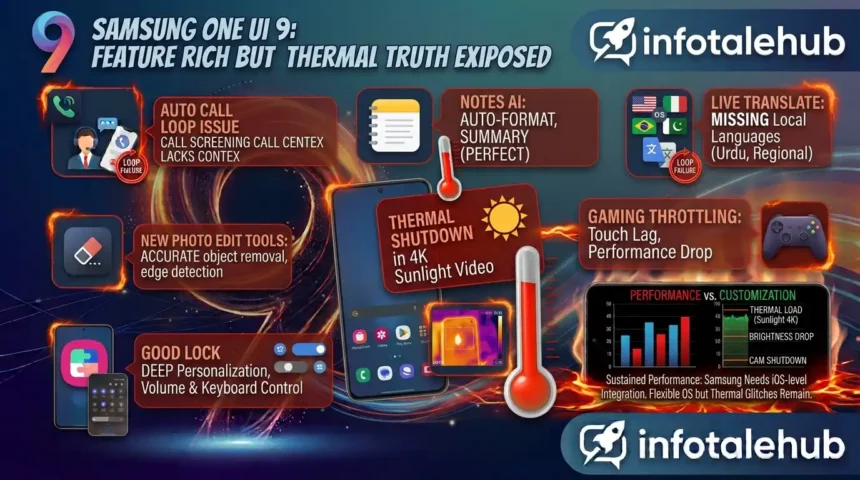
- The Call Screening Loop: The automated Call Screening feature displays significant operational failure during practical tests. When interacting with automated telemarketing or IVR systems (which also use AI-generated voices), One UI 9 fails to comprehend context. Instead of analyzing the caller’s intent, the system blindly defaults to connecting the call to the user. This inability to differentiate human context from automated loops poses both a usability flaw and a operational nuisance.
- Language Accessibility Gaps: Live Translation performs adequately for supported languages, but suffers from a severe lack of regional and local language packs—such as Urdu and specific localized dialects—limiting its global utility.
Notes AI and Smart Routines (The Top Performers)
- Notes AI: Summarization, handwriting cleanup, and document formatting remain flawless, earning top marks for productivity.
- Smart Routines: System automation and contextual profile switching operate smoothly without causing background system stutter.
Speed, Performance & Gaming: Hardware Power vs Software Throttling
Evaluating performance requires looking beyond synthetic benchmarks and simple app launch animations. Real-world multitasking and gaming expose significant software-level bottlenecks within One UI 9.
Animation Rendering and Multitasking
System animations are smoother compared to older versions, featuring non-linear blurring effects and interruptible gestures. However, despite running on 12GB RAM configurations, heavy background AI processing causes noticeable micro-stutters and frame drops when launching new applications.
- +——————————————————————————-+
- | SYSTEM PERFORMANCE COMPARISON TABLE |
- +———————+————————-+——————————-+
- | OS Platform | Gaming Stability (FPS) | Thermal Throttling Control |
- +———————+————————-+——————————-+
- | Apple iOS | Industry Leader (High) | Excellent (Consistent Output) |
- | OnePlus OxygenOS | High Fluidity (Stable) | Very Good (Sustained Frames) |
- | Samsung One UI 9 | Moderate (Throttles) | Aggressive (Brightness Drops) |
- +———————+————————-+——————————-+
Sustained Gaming: One UI 9 vs OxygenOS & iOS
Despite hardware integration like the Snapdragon 8 Elite platform, One UI 9 struggles to deliver sustained gaming performance during extended sessions:
- Frame Drops and Touch Latency: In games like Genshin Impact or PUBG, rising device thermals trigger aggressive software throttling, resulting in touch response delays and frame drops.
- Competitor Performance: Competitors running OxygenOS or Apple iOS maintain higher sustained frame rates and superior touch responsiveness over long gaming sessions on comparable hardware.
Advanced Customization: Media Player & Good Lock Integration
Customization remains Samsung’s greatest advantage over rival platforms, and One UI 9 refined this layer further.
+——————————————————————————-+
| ONE UI 9 CUSTOMIZATION PROFILE |
+——————–+———————————————————-+
| Feature Area | Customization Capabilities |
+——————–+———————————————————-+
| Waveform Player | Dynamic animated audio bar on Lock Screen & Quick Panel |
| Good Lock Engine | Pixel-level tweaks for Keyboard, Volume Bar & UI Layouts |
| Material You 3.0 | Natural palette color-matching across system icons |
+——————–+———————————————————-+
Dynamic Waveform Media Player
The highlight of One UI 9’s visual tweaking is the dynamic waveform media player. Operating seamlessly across the Quick Panel, Lock Screen, and Always On Display (AOD), the animated audio bars offer a polished user experience.
Good Lock Integration
Good Lock integration provides deep system personalization:
- Keyboards and Volume Panel: Total control over key tap effects, layout colors, and volume slider positioning.
- Interface Fine-Tuning: Granular adjustment of quick setting toggles, transparency levels, blur intensity, and system icon shapes.
Note: Extensive visual customization demands aggressive background resource management. When heavy Good Lock themes are applied without proper background optimization, system lag increases—an area where platforms like Xiaomi’s HyperOS manage visual layering with slightly higher efficiency.
Battery & Thermal Management: The Sunlight 4K Recording Failure
An operating system’s primary duty is balancing power consumption with thermal regulation, especially when managing panel power according to [DisplayMate testing standards]. In this department, One UI 9 exhibits critical weaknesses under extreme stress tests.
Outdoor 4K Video Recording Stress Test
In real-world outdoor tests under direct sunlight, continuous 4K video recording exposed a severe software-level thermal management flaw:
- Processing heavy camera algorithms in high ambient temperatures caused rapid thermal buildup.
- Rather than gracefully managing hardware resources, One UI 9 forcibly dimmed display brightness to minimum levels.
- Shortly after, the OS displayed a thermal warning and completely shut down the camera and system.
In identical environmental conditions, rival flagship smartphones recorded continuously for 30 minutes longer without triggering thermal shutdown warnings. This confirms that the issue lies within Samsung’s software throttling algorithms rather than the underlying cooling hardware.
-
STRESS TEST BEHAVIOR [ Direct Sunlight 4K Video Recording Session ]|v[ Rapid Internal Heat Generation ]|v[ Aggressive Display Brightness Drop ]|v[ Thermal System Warning & Forced OS Shutdown ]
One UI 9 vs Apple iOS: The Integration Gap
Comparing One UI 9 against Apple’s latest iOS ecosystem (tested on hardware like the iPhone 18 Pro Max) highlights fundamental differences in system design philosophy.
Conversational AI: Bixby vs Siri & ChatGPT
- iOS Chained Commands: iOS allows continuous, back-to-back voice interaction via deep ChatGPT integration. Users can execute multiple consecutive commands without repeatedly re-triggering the assistant manually.
- Bixby Interruption: Bixby in One UI 9 fails at conversational loops. Users are forced to manually tap or re-trigger the assistant for every individual task, disrupting multitasking workflows.
Hardware Control and Optimization
Apple’s strength lies in total OS-to-hardware integration. iOS manages thermals, touch sample rates, and power consumption during heavy 4K rendering and extended gaming without sacrificing display clarity or user responsiveness. Samsung builds hardware with massive Vapor Chambers, but One UI 9 lacks the low-level software optimization needed to harness that raw power consistently.
To see how this software stack holds up against Apple’s ecosystem, check out our [Samsung vs. iPhone real-world comparison].
Eligible Devices & Official Rollout Schedule
Samsung is rolling out the One UI 9 update in phased releases, with official announcements tracked via the [Samsung Newsroom updates].
S-Series (Phase 1)
- Galaxy S26, S26+, S26 Ultra
- Galaxy S25, S25+, S25 Ultra
- Galaxy S24, S24+, S24 Ultra
Galaxy Foldable Series (Phase 1 & 2)
- Galaxy Z Fold 7 / Z Flip 7
- Galaxy Z Fold 6 / Z Flip 6
- Galaxy Z Fold 5 / Z Flip 5
Galaxy A-Series & FE (Phase 2 & 3)
- Galaxy S24 FE / S23 FE
- Galaxy A56 / A36 / A55 / A35
Final Verdict
Samsung One UI 9 delivers an enjoyable visual experience powered by refined media player animations, deep Good Lock personalization, and steady day-to-day usability. However, for power users, high-frame-rate gamers, and mobile video creators, the update falls short of perfection.
Until Samsung shifts its primary focus from surface-level features toward core OS-level thermal management, gaming optimization, and seamless voice AI workflows, One UI 9 will remain a feature-rich interface that struggles under heavy real-world stress.