



Introduction: The Event Illusion vs. Retail Shop Realities
Tech giants host expensive launch events every year. Their main goal is simple. They want to convince users that the newest flagship is an essential upgrade.
- Introduction: The Event Illusion vs. Retail Shop Realities
- What’s New in One UI 9 vs. One UI 8.5: The Full Breakdown
- 1. Redesigned Quick Panel
- 2. Stunning Ambient Media Player
- 3. Dynamic ‘Now Brief’ Cards
- 4. Deep Good Lock Integration
- My Personal Hands-On Testing: Galaxy S25 Ultra Transformation
- Camera Features Downloaded: The S26 Ultra Software Cascade
- The Display Panel Truth: 8-Bit vs. 10-Bit Color Depth
- What the Galaxy S26 Ultra Retains (Hardware Exclusives)
- Why Galaxy S26 Ultra Resale Value Collapsed
- Recommendations for Samsung: Galaxy S27 Ultra Roadmap
- Conclusion: One UI 9 Proves Older Ultras Are Still Kings
Samsung officially launched the Galaxy S26 Ultra on stage recently. Their presentation heavily highlighted mobile AI tricks. They also showed new camera stabilization tools and creative video features. The marketing pushed tech enthusiasts to trade in their current phones immediately.
However, I run a mobile retail business. I conduct daily hands-on hardware stress tests on the shop floor. I instantly spotted a big strategic mistake in Samsung’s presentation. Most of the headline features were not hardware-bound. Instead, they were software-driven capabilities.
The stable One UI 9 update is now rolling out globally. It is available for older flagships like the Galaxy S25 Ultra and S24 Ultra. These exact flagship features have now landed on existing devices.
I installed the stable One UI 9 update on my daily Galaxy S25 Ultra. I put it through rigorous stress testing. The real-world results were astonishing.
Why pay top dollar for a new Galaxy S26 Ultra? The One UI 9 update turns your existing Galaxy S25 Ultra into a performance monster. In this review, we will examine the full feature landscape of One UI 9. We will evaluate my personal gaming tests and dissect display truths. Finally, we will explore why the S26 Ultra value declined so fast.
What’s New in One UI 9 vs. One UI 8.5: The Full Breakdown
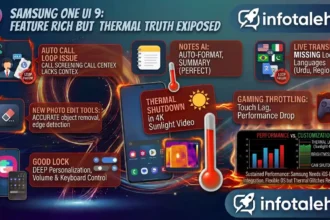
One UI 9 is a massive leap over One UI 8.5. Samsung did not just update system icons. They completely revamped system memory management. They also improved background power allocation and user interface responsiveness.
+-----------------------------------------------------------------------+
|                    ONE UI 8.5 VS ONE UI 9 ARCHITECTURE                |
+-----------------------------------------------------------------------+
| FEATURE CATEGORY     | ONE UI 8.5 SYSTEM ARCH    | ONE UI 9 UPDATE STABLE|
+----------------------+---------------------------+------------------------+
| Base OS Version      | Android 16                | Android 17             |
| UI Animation Engine  | Dual-Thread Vector Motion | Predictive Physics UI  |
| Quick Panel Layout   | Fixed Tile Grids          | Fully Resizable Tiles  |
| System Media Player  | Basic Compact Widget      | Dynamic Lyrics & Wave  |
| Notification Engine  | Categorized Text List     | Interactive Live Cards |
| Memory Management    | Static RAM Plus Allocation| Dynamic Memory Compression|
+-----------------------------------------------------------------------+
1. Redesigned Quick Panel
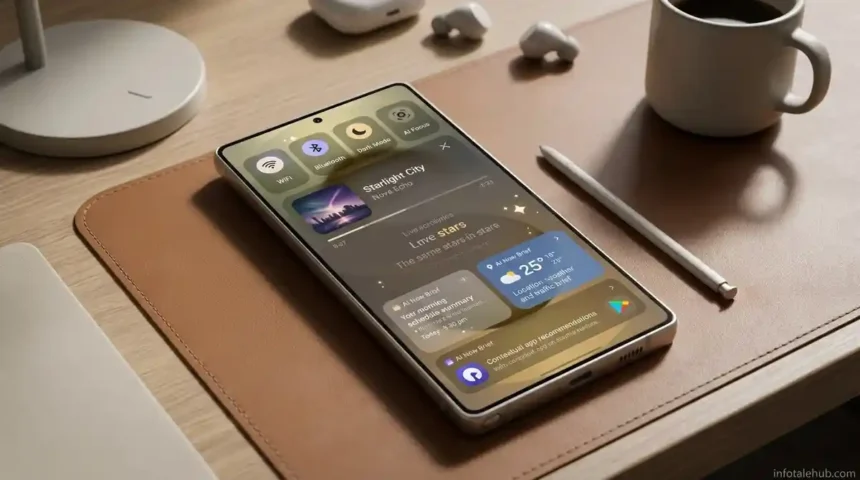
One UI 9 completely reimagines how users toggle settings. One UI 8.5 forced rigid grid layouts. In contrast, One UI 9 introduces resizable control tiles. It features separate volume and brightness sliders with fine haptics. The status bar layout is cleaner and reduces visual clutter.
2. Stunning Ambient Media Player
The new Media Player is a stand-out visual upgrade in the One UI 9 update. When playing music, the widget displays a dynamic wave animation. The colors change based on album artwork. One UI 9 also integrates live lyrics onto the lock screen. This turns simple audio playback into an aesthetic visual experience.
3. Dynamic ‘Now Brief’ Cards
One UI 9 replaces static lock screen widgets with dynamic Now Brief Cards. These AI-curated cards adapt throughout your day. They display health metrics, calendar events, live traffic updates, and smart shortcuts based on your daily routine.
4. Deep Good Lock Integration
Samsung deeply optimized its Good Lock suite within One UI 9. Modules like NavStar and Home Up now operate natively within the core system framework. Customizing gestures and icons no longer causes battery drain or UI stutters.
My Personal Hands-On Testing: Galaxy S25 Ultra Transformation
Some users claim an OS patch is “just software.” However, software optimization is the beating heart of a phone. It dictates CPU limits, touch sampling, and battery power delivery.
My Galaxy S25 Ultra suffered from subtle flaws on One UI 8.5. It had issues during heavy gaming and multitasking. The stable One UI 9 update completely eliminated those problems.
+-----------------------------------------------------------------------+
|           REAL-WORLD BENCHMARK: GALAXY S25 ULTRA ON ONE UI 9          |
+-----------------------------------------------------------------------+
| TEST PARAMETER         | ONE UI 8.5 PERFORMANCE   | ONE UI 9 STABLE REVIEW|
+------------------------+--------------------------+-----------------------+
| Gaming Touch Latency   | Subtle Delay on Sweating | Instant Registration  |
| Frame Rate Stability   | Occasional Micro-Stutters| Lock-Solid Max FPS    |
| Gaming Thermal Profile | Uncomfortable Hot Spots  | Even VC Heat Spreading|
| 7-Match Battery Drain  | ~50% Battery Consumed    | 44% Battery Consumed  |
| App Cold-Start Speed   | Fast                     | Instant / Zero Delay  |
+-----------------------------------------------------------------------+
1. Gaming and Battery Efficiency Test
PUBG Mobile was a mixed experience on One UI 8.5. During heavy squad fights, frame rates dropped. Touch inputs registered with slight latency. Battery consumption was also severe. Playing 3 TDM matches and 2 Classic matches used nearly 50% battery.
I executed an identical gaming test after installing the One UI 9 update:
- The Test Protocol: I played 3 full Livik Classic matches and 4 TDM matches consecutively. I set graphics to maximum frame rates.
- The Battery Result: The Galaxy S25 Ultra consumed only 44% battery across seven matches.
- Zero Frame Drops: Touch input delay was completely gone. The game ran with buttery smoothness. Heat distribution was handled masterfully. The software manages the vapor chamber efficiently now.
2. Flawless Animation Speed
Daily interactions on the S25 Ultra feel lighter and faster now. Swiping between heavy apps occurs with absolute fluidity. The same applies when browsing our technology news and hardware reviews. The predictive touch pipeline ensures your finger never outpaces display rendering.
Camera Features Downloaded: The S26 Ultra Software Cascade
The One UI 9 update brought almost the entire creative camera feature set to older devices. The Galaxy S25 Ultra and S24 Ultra received major camera additions.
+-----------------------------------------------------------------------+
|                 S26 ULTRA SOFTWARE FEATURES ON ONE UI 9               |
+-----------------------------------------------------------------------+
| FEATURE NAME              | FUNCTIONALITY ON GALAXY S25 ULTRA         |
+---------------------------+-------------------------------------------+
| Creative Studio AI        | Full Generative Editing & Style Transfer  |
| My FanCam Video Tracking  | Auto-Framing & Subject Isolation          |
| Super Steady Horizon Lock | 360-Degree Hardware-Assisted Leveling     |
| AI Document Scanner Pro   | Dynamic Shadow Elimination & OCR          |
+---------------------------+-------------------------------------------+
1. Creative Studio and My FanCam
Samsung showcased Creative Studio during the S26 Ultra launch. It is an AI suite designed to generate artwork and edit photo backgrounds. They also highlighted My FanCam for smooth subject tracking. Both features are now fully functional on the Galaxy S25 Ultra via the One UI 9 update.
2. Super Steady Video with Horizon Lock
Super Steady with Horizon Lock was a major selling point for the S26 Ultra. It lets creators rotate the phone completely while keeping the video feed level. Galaxy S25 Ultra owners discovered this feature is powered by software gyro-processing. It works flawlessly on older hardware now.
The Display Panel Truth: 8-Bit vs. 10-Bit Color Depth
Display color depth is a hot topic across online tech forums. YouTubers uploaded comparisons showing smoother color gradients on the S26 Ultra. This led buyers to believe Samsung introduced a revolutionary screen.
+-----------------------------------------------------------------------+
|               SAMPLING DISPLAY PANEL COLOR DEPTH TRUTHS               |
+-----------------------------------------------------------------------+
| DEVICE MODEL       | HARDWARE PANEL SPECIFICATION | COLOR SPECTRUM    |
+--------------------+------------------------------+-------------------+
| Galaxy S24 Ultra   | 8-Bit Native Panel           | 16.7 Million      |
| Galaxy S25 Ultra   | 8-Bit Native Panel           | 16.7 Million      |
| Galaxy S26 Ultra   | 8-Bit Panel + OS Dithering   | 16.7 Million      |
| Competitor Target  | 10-Bit / 12-Bit Native Panel | 1.07B to 68B      |
+-----------------------------------------------------------------------+
The 8-Bit Hardware Reality
Samsung continues using an 8-bit display panel across its flagship lineup. They have not upgraded to a true 10-bit panel or 12-bit panel yet.
The visual difference shown in early reviews was simply a software color-dithering algorithm. The One UI 9 update brought that exact software calibration to the S25 Ultra and S24 Ultra. The visual gap disappeared instantly.
What the Galaxy S26 Ultra Retains (Hardware Exclusives)
The Galaxy S26 Ultra does possess physical hardware exclusives that software updates cannot replicate:
- Hardware APV Codec Support: The S26 Ultra includes physical silicon blocks for decoding the Advanced Professional Video (APV) Codec. Pro videographers can edit uncompressed streams natively.
- Built-In Physical Privacy Display: The S26 Ultra introduced a physical micro-louver privacy layer inside the glass. It restricts side viewing angles at a hardware level.
Why Galaxy S26 Ultra Resale Value Collapsed
The rapid collapse in S26 Ultra demand stems from a marketing error. Samsung spent its keynote advertising software innovations as reasons to buy new physical hardware.
Power users realized the free One UI 9 update solved gaming frame drops and improved battery life on older devices. It also added Horizon Lock camera features. As a result, users saw no reason to spend $1,300+ on a new phone. Second-hand prices for older Ultras remained high, while the S26 Ultra depreciated rapidly.
Recommendations for Samsung: Galaxy S27 Ultra Roadmap
Samsung must deliver genuine physical innovation on the Galaxy S27 Ultra:
- Adopt Native 12-Bit Display Panels: Samsung should transition to true 12-bit AMOLED screens. They output 68 billion natural colors without software dithering tricks.
- Higher-Density Battery Tech: Pair software power management with physical silicon-carbon batteries and massive cooling plates.
- Focus on Non-Downloadable Silicon: Build physical hardware exclusives like variable aperture lenses and dedicated camera ISPs.
Conclusion: One UI 9 Proves Older Ultras Are Still Kings
The stable One UI 9 update is a transformative software release. It fixes gaming touch latency and eliminates thermal throttling. It also extends battery life and introduces beautiful UI elements.
Upgrading to the S26 Ultra makes very little financial sense today. Stick with your Galaxy S25 Ultra or S24 Ultra instead. Enjoy the power of One UI 9. You can check official Samsung updates to experience modern Android software design at its best.